
You may be missing out on an excellent growth opportunity for your business by not using TripAdvisor, the world's leading digital travel platform. With an average of 456 million unique monthly visitors, TripAdvisor stands out as an essential tool for businesses looking to increase their visibility.
If you own a local business and want to attract more customers, having an optimized and monitored profile on TripAdvisor is essential. With approximately 435 million reviews and opinions on 6.8 million accommodations, restaurants, and attractions, TripAdvisor offers a vast field of opportunities.
The platform is particularly popular among Generation Y (born between 1980 and 2000), known as millennials, who value price comparison and the authenticity of other travelers' experiences.
Do you want to know how TripAdvisor works for businesses and how it can be useful in your business strategy? This complete guide to TripAdvisor will show you everything you need to know to make the most of this platform, from creating an optimized profile to customer engagement strategies.
What is TripAdvisor?
Tripadvisor is a digital travel platform that has revolutionized the way people plan their travel experiences. Founded in 2000, it has become one of the world's largest travel websites, offering a vast range of information and reviews on establishments, accommodations, and attractions.
The platform is a pioneer in the use of user-generated content, allowing travelers to share their experiences through ratings and reviews. This collaborative model not only helps consumers make more informed decisions, but also provides significant visibility for businesses listed on the platform. When a company creates its profile on TripAdvisor, customers can rate and comment on their experiences, directly impacting the establishment's reputation and visibility.
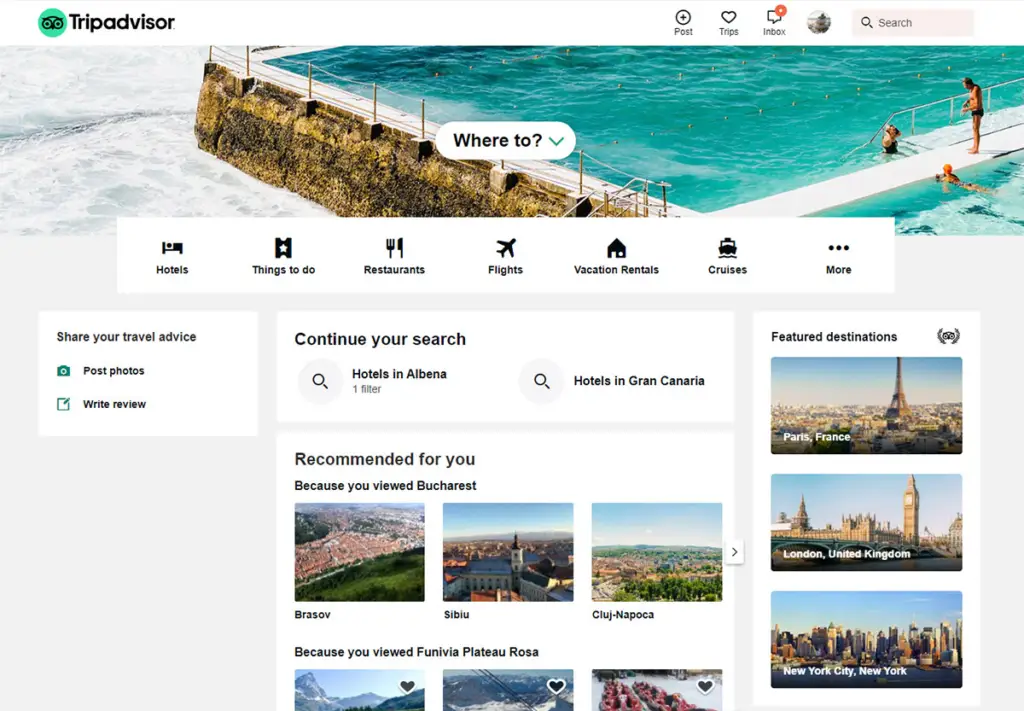
As the company itself points out: “TripAdvisor offers the wisdom of other travelers to help people decide where to stay, which flight to take, what to do and where to eat.” This commitment to user experience is one of the factors contributing to the platform's popularity, which operates in 49 markets around the world and has a community of 456 million unique monthly visitors.
In addition to reviews, TripAdvisor offers several features, such as price comparison tools, direct booking, and a question-and-answer system. These features help travelers find the best prices and options that meet their needs.
According to research, a large percentage of consumers say that online reviews influence their purchasing decisions. Approximately 93% of consumers say that online reviews impact their purchasing decisions, highlighting the importance of the platform for local businesses.
Why is it important for your company to have a profile on TripAdvisor?
One of the priorities for local businesses, especially in recent years, is managing their online reputation and how to handle customer reviews. Having a TripAdvisor profile and monitoring it is crucial for any online reputation strategy, whether you're a hotel, inn, restaurant, or tourist attraction.
More and more people are using TripAdvisor to plan their trips, looking for places to stay, eat, and have fun. They tend to choose establishments with well-managed profiles and positive reviews. A 2016 study by Statista found that 86% of millennials were influenced by TripAdvisor in their accommodation decisions, highlighting the platform's impact on consumer choice.
TripAdvisor has established itself as a trusted source for users worldwide for two main reasons. First, it seeks to understand user needs based on shared experiences, adapting the platform to best meet those needs and thus gaining credibility with the public. Second, reviews are written by customers themselves, who generally trust the opinions of other consumers more than the statements of companies. The site constantly invests in rigorous review policies to prevent fraud or unfairness, both on the part of companies and users.
In addition to all this, there are other significant advantages to having a Tripadvisor profile:
- Completely free: Creating and maintaining a profile is a cost-free marketing opportunity, allowing you to reach a vast audience.
- The world's largest travel website: With over 455 million monthly visitors, TripAdvisor is a powerful platform for promoting your brand, especially in the restaurant industry.
- Free marketing tools: The site offers several tools that help promote your business, making it easier to connect with potential customers.
- Strengthening customer relationships: Interactions on TripAdvisor, especially after recent updates, allow for closer contact with customers, enabling you to respond to reviews and show that you value their feedback.
In short, having an optimized TripAdvisor profile not only increases your business's visibility but also provides an invaluable opportunity to build relationships with your customers and enhance your online reputation.
How to create a profile for your business on TripAdvisor
Registering your business on TripAdvisor is an essential step to increase your visibility and attract new customers. There are two main ways to do this:
- Profile registration: This can be done by you or by an authorized representative of your establishment.
- Profile claim: This occurs when a customer tries to review your establishment and doesn't find an existing profile. In this case, a profile for your business is automatically created, which can be claimed by the owner at any time.
How to create a profile for your business on TripAdvisor
To begin the process, go to the TripAdvisor page for owners. In the search field, type the name of your establishment. If it appears, it means a traveler has already started creating your profile. In that case, click on "Claim your listing" and follow the instructions to claim it. If there are no results, click on the "Create a listing now" link.
On the next page, you will need to select your business type and fill out your profile with as much information as possible. The more complete and accurate your listing is, the greater the chances of travelers finding your establishment.
Importance of Verification: TripAdvisor needs to confirm that you truly represent the business and that it exists. Therefore, provide accurate and precise details. This information not only helps in creating your profile but is also used to verify that your establishment meets the established criteria.
Tips for describing your business
In your establishment's description, highlight its key differentiators to attract travelers seeking something specific. Consider creating a descriptive text in multiple languages, making it accessible to travelers of different nationalities and expanding your reach.
When filling out the information, remember: the more information you provide about your establishment, the greater the chance of attracting new customers. In addition, include details about the services you offer, as this helps align visitor expectations.
The importance of images
In this final step, you will need to choose photos for your profile. Important tip: Good photos are crucial for success on the platform. According to research conducted by TripAdvisor itself, profiles with at least one photo attract 138% more visits. Therefore, choose high-quality images that accurately represent your establishment.
Finalize the creation of your profile by reviewing all the information provided. Check the box next to the text, which confirms that you represent the company indicated in the profile and that the information is correct. This also guarantees the right to use the photos submitted. Click the SUBMIT and you're done! Your profile will be successfully completed. The TripAdvisor team will contact you within 5 business days.
How to claim a profile on TripAdvisor
Claiming a Tripadvisor listing is a crucial step in controlling and managing your business's online presence. To begin, type your business name into the platform's search field. Select your business from the results and click the "Claim your listing" button. It's important to remember that Tripadvisor only allows one listing per business, so choose carefully.
Identity verification
At this point, you will need to verify your identity. This process is required for all registered Tripadvisor owners and serves to confirm your affiliation with the business. If you are already a Tripadvisor member, simply enter your email and password to log in. Otherwise, you will need to create an account, and you will have three options: use your Facebook or Google credentials, or register a new email address.
Necessary information
In this step, you will be asked to provide all your personal information and details about your business. It is crucial that this information is accurate and complete, as it will help validate your profile and improve the user experience for those searching for your business.
Verification methods
After providing your information, you will need to verify your identity. The most common forms of verification include:
- Phone verification: You will receive a code via SMS to confirm your identity.
- Facebook verification: If you are logged into Facebook, you can use this option to make the process easier.
- Credit card verification: In this option, you enter your card details; there is no charge, but the procedure confirms the authenticity of your profile.
Completing the process
After verifying your identity, the next step will be to complete your profile with all relevant information, as discussed earlier. This will include details about the services offered, attractive descriptions, and high-quality images that represent your establishment.
Claiming your profile on TripAdvisor not only ensures you have control over the information displayed to potential customers, but also allows you to respond to reviews and interact with users, helping to build a solid online reputation.
What is Tripadvisor Premium Account?
This is a subscription-based service that delivers certain features to help your business profile stand out from the competition. You don't need a subscription to also achieve excellent results on the platform. But it's good to know the option exists. Learn more here.
How does the TripAdvisor ranking system work?
TripAdvisor's ranking plays a crucial role in your business's visibility on the platform. Businesses positioned at the top of the search rankings have a significantly higher chance of being viewed and chosen by customers. The main factors influencing popularity and ranking on the platform are:
1. Score
Your establishment's rating is directly related to the number of reviews received. The more positive reviews (especially four and five stars), the better your ranking will be. TripAdvisor prioritizes places with more five-star reviews when all other factors are equal. This means that encouraging your customers to leave positive reviews can have a significant impact on your ranking.
2. Recency
Recency refers to how frequently new reviews are posted for your establishment. While older reviews still contribute to your ranking, more recent reviews are considered more representative of the current experience offered. Therefore, when all other factors are equal, the place with more recent reviews ranks higher. This highlights the importance of engaging customers and encouraging them to continually share their experiences.
3. Relevance
Relevance is a multifaceted criterion that considers what the user is looking for on TripAdvisor. When a customer searches for a restaurant, they may not just be looking for "restaurants in general" in a city, but something more specific, such as a place to dine, a pizzeria, or a typical gastronomic experience. This means that your establishment can be ranked in different ways, depending on the keywords used by users and the suitability of your business to those searches.
4. Customer Interaction
In addition to the factors mentioned above, how you interact with your customers can also influence your ranking. Responding to reviews, thanking customers for positive feedback, and addressing criticism constructively demonstrates that you value customer opinions, which can result in more favorable reviews and, consequently, a higher ranking.
5. Profile Update
Keeping your profile updated with accurate information, new photos, and engaging descriptions is essential. This not only improves the user experience but can also positively impact your ranking on the platform. TripAdvisor prioritizes profiles that are actively engaged and provide useful information for travelers.
How can you improve your TripAdvisor ranking and stand out in search results?
1. Provide the best possible experience
The quality of the experience you offer your customers is fundamental to your establishment's success on TripAdvisor. The more positive the experience, the more likely you are to receive four- or five-star reviews. Consider the following aspects to enhance the customer experience:
- Team Training: Invest in training for your team, ensuring everyone is aligned with your company's customer service values.
- Pleasant Atmosphere: Create a welcoming and pleasant environment that makes customers want to return.
- Personalized Service: Strive to understand your customers' needs and personalize the service whenever possible.
2. Encourage and receive more reviews
The most effective way to improve your TripAdvisor ranking is to increase the number of reviews your establishment receives. The more reviews you have, the greater your visibility on the platform. Some strategies for obtaining more feedback include:
- Direct Requests: At the end of the experience, ask customers to leave a review. You can do this in person, by email, or even through text messages.
- Thank You Cards: Send thank you cards after the visit, encouraging customers to share their experiences online.
3. Encourage evaluations of specific items
When requesting reviews, encourage your customers to mention specific items or experiences they enjoyed. For example, if you're a restaurant and a customer loved your lasagna, ask them to mention that in their review. This not only helps create a richer review but can also benefit your local SEO by using relevant keywords. Consider:
- Create a "Review Menu": Develop a leaflet or card where customers can mark their favorite dishes and be encouraged to comment on them in the review.
- Run Themed Promotions: Create promotions that encourage customers to try specific menu items and then leave a review about their experience.
4. Respond to assessments
Interacting with customers by responding to reviews is a highly recommended practice. When you respond to reviews, you show that you value customer feedback, which can increase customer loyalty and satisfaction. Furthermore, TripAdvisor considers interaction a positive factor in ratings. Some tips include:
- Thanking Customers for Positive Reviews: Always thank customers who leave positive feedback and mention specific aspects of their reviews.
- Addressing Criticism Constructively: When you receive criticism, respond professionally and offer solutions, showing that you care about improving the customer experience.
5. Keep your profile information up to date
Make sure all the information on your TripAdvisor profile is correct and up-to-date. This includes:
- Contact Information: Please verify that your phone number, address, and hours of operation are correct.
- Quality Photos: Regularly update your photos, showcasing the environment and products in an attractive way. Profiles with good images attract 138% more visits, according to TripAdvisor.
- Attractive Description: Write a clear and captivating description of your business, highlighting its differentiators and what makes it unique.
6. Use TripAdvisor as a marketing tool
Explore the free tools that TripAdvisor offers for property owners. This includes:
Sponsored Ads: Consider investing in ads to increase the visibility of your profile and reach more potential customers.
Promotions and Offers: Use the platform to promote special offers, which can attract more visitors and, consequently, more reviews.
👉Check it out: Local SEO: the 9 vital factors for ranking in a local search.
How to optimize your business profile on TripAdvisor
1. Verify and update the establishment details
Make sure all the profile information is correct. Verify the name, address, and phone number, as well as the links to your website and email. Add any other information that may be useful to the user. Remember to check your business category.
2. Upload photos
People buy with their eyes. Select an attractive main photo to help make a great first impression. Change this image frequently to keep your profile up-to-date. You can upload an unlimited number of images; take advantage of this to showcase the best your business has to offer.
3. Mark the establishment on the map
Maps help people locate their restaurant in the area they are visiting and plan their trip better.
4. Include a booking button
Customers will be able to quickly and easily place orders or make reservations from anywhere directly through your profile. For this to work, your establishment needs to be registered on one of TripAdvisor's partner websites.
5. Promote your profile on TripAdvisor.
Want customers and pedestrians to know you're on the platform? Order a TripAdvisor sticker and place it in a prominent location. This shows customers that you value their opinions and encourages them to review your establishment. In the Management Center you'll find stickers, business cards, magnets, and many other items. To place an order, click on "Promotional Tools" in the "Free Tools" menu at the top of the page.
6. Add a widget to your website
A great way to promote your profile is to place a TripAdvisor widget on your website. It displays your reviews and encourages customers to leave more.
7. Encourage customers to rate your establishment
The more feedback you receive, the greater the chances of getting four- and five-star reviews, which help you climb the rankings. We'll talk more about this later.
8. Answer the assessments
By responding to reviews regularly, you set your establishment apart from the competition. Whether the feedback is positive or negative, leaving a response shows that you take customer service seriously.
9. Drive traffic to your profile using TripAdvisor Ads
The ads are targeted to a specific audience, in other words, people ready to buy. You don't need a premium account to buy ads on the site.
What are TripAdvisor Seals?
The quality seals provided by TripAdvisor certify the profiles of businesses or tourist destinations that meet the demands of the traveler/user community.
Earning TripAdvisor badges means more recognition for your business and will make you stand out even more from the competition.
AWARD STAMPS:
Certificate of Excellence
Tourism and hospitality establishments that offer high-quality services and have received excellent traveler reviews in the past year are eligible for the certification. To obtain this certification, your business profile on the platform must have been active for at least one year, have a minimum number of reviews, and maintain a minimum overall rating of four to five stars. This certification is updated annually.
Travellers' Choice
Created in 2002, this is the highest award TripAdvisor can give. Winners of the Travellers' Choice awards are selected annually based on feedback from thousands of TripAdvisor members. The award reflects "the best of the best" in terms of service, quality, and customer satisfaction. Hotels, accommodations, destinations, attractions, and even brands and products are recognized.
RECOGNITION SEALS
Rated on TripAdvisor
Depending on traveler ratings and reviews, there are three types of badges: “We Are Here,” “Rated,” and “Recommended” on TripAdvisor. The badge is updated daily to reflect changes in the number of reviews and ratings.
Very good!
Available to establishments that receive a minimum number of excellent reviews.
EcoLeaders:
Awarded to establishments that promote ecological activities with a positive impact on nature and the community around their location.
How to improve your business performance using TripAdvisor Widgets
Widgets can be inserted into the official pages of establishments and play various roles, such as strengthening the company's online reputation by conveying prestige and credibility, or making it easier for your establishment to receive more reviews.
Below are some widgets you can add to your business for free:
- "TripAdvisor Rated" badges: you can and should display the badges you earn on the platform on your website.
- Review Snippets Widgets: With various styles to choose from, you can display TripAdvisor ratings, excerpts from recent reviews, and much more on your website.
- "Very good!" seal: available for establishments that receive a minimum number of excellent reviews.
- "Leave a review" widgets: make it easy for customers to rate your establishment using this feature. The easier and more intuitive the process, the more reviews you receive.
- TripAdvisor app for Facebook: share your TripAdvisor ratings and reviews with your fans on Facebook.
- Award badges: If you have won the Certificate of Excellence or the Travellers' Choice award, share this achievement on your website.
- TripAdvisor social media buttons: customize and display a small icon on your page alongside other social media widgets.
- Rating widget: Display your establishment's TripAdvisor rating with this widget.
- Widget “Positive Reviews”: create a scrolling presentation to display the latest excellent review you have received.
- EcoLeader Widgets: Tell everyone that you're a TripAdvisor EcoLeader.
How are reviews managed on TripAdvisor?
Before being published, the review goes through a series of electronic checks and in-depth analysis, and then it is determined which path it will follow.
Most reviews pass through the system without any problems and are posted. Those that violate the site's policy are rejected, and those that present something suspicious are analyzed more closely.
Tripadvisor has 3 categories of suspicious reviews:
- Review boosting: when companies unfairly try to boost their reviews;
- Review vandalism: when someone tries to defame a business by optimizing negative reviews;
- Review optimization: when agencies are paid to fake positive reviews on behalf of a company.
This link provides a list of what is considered fraud on TripAdvisor.
How do I report a review on TripAdvisor?
This link provides a list of guidelines for reviews on the site. Once a review is found to violate these guidelines, it will be removed by the TripAdvisor team.
However, disagreeing with a negative review your business received is not sufficient reason to guarantee its removal from the platform. TripAdvisor does not moderate or adjudicate disputes.
To "report" a review on TripAdvisor:
- Log in to the Administrator Portal.
- Click on “Reviews” in the top menu and choose “Report a review”.
- In the section "What is the problem with the evaluation?", choose one of the options and fill out the rest of the form.
It may take several days to receive the result of your request, and there are no guarantees that the review will be removed.
We suggest that you DO NOT fail to respond to negative reviews, even if you disagree with the content. This shows other users that you are attentive to your customers' opinions and that you care about their satisfaction.
Very important: do not engage in an argument with the person who posted the negative feedback; this will significantly worsen the situation for your company. See these 7 simple steps to never again make mistakes when responding to negative online customer reviews.
How to report blackmail on TripAdvisor
It's possible that one day your hotel or inn could fall victim to blackmail by opportunistic customers. On TripAdvisor, blackmail is defined as when a customer threatens to leave a negative review if their abusive demands are not met. For example: an unexpected upgrade, an unfair refund, or similar things.
Tripadvisor recommends that you report these threats immediately, even before the blackmailer's review is posted.
To report that your establishment is being blackmailed on TripAdvisor, do the following:
- Log in to the Administrator Portal.
- Click on Help and settings in the top menu and select Help Center.
- Next, click on Contact Us at the top of the page and select Owner Support.
- In the "Tell us what the problem is" section, select "Report fraud.".
- In the "What do you want to do?" section, select "Report blackmail threat" and provide more information about the employee, including name, email, location, and stay dates. The content of the review should match what you described in the blackmail report.
Read about the blackmail policy here.
This process is only for feedback that hasn't been sent yet. If the blackmailer's evaluation has already been posted, follow these steps:
- In the Administrator Portal, select Report a review from the Reviews menu at the top.
- Select "Questions about evaluations" as the problem.
- Select a suspicious review.
- As the reason, select "I want to report another problem.".
- Select the evaluation in question from the dropdown menu.
- In the space provided, supply documents and present facts that prove the assessment is the result of blackmail.
How to respond to your reviews on TripAdvisor the right way
Try to view your reviews both as real-time feedback on your business's performance and as an essential marketing tool for your business's success. Users read reviews to get an idea of their experience at that place. Good review management can function as an online version of word-of-mouth advertising.
Below is a step-by-step guide on how to respond to reviews on TripAdvisor
Answer all reviews
Regardless of whether the review is positive or negative, try to respond to all of them. Start with the negative reviews with comments, then move on to the positive reviews, also with comments. Continue responding to the negative and positive reviews without comments, in that order.
Always say thank you for the review
Even if the feedback is negative, say thank you. Most people rate a place with the intention of helping, so thanking them is good etiquette and shows that you care about their opinion.
Use the keywords
When someone searches for your place on Google, the reviews you've received appear in the search results, as do your responses. The right keywords will help you rank higher. Important: do not mention the name of your establishment in responses to negative reviews.
Be professional and kind
Never, ever, under any circumstances, get into an argument with your client because of a negative review. Defining a code of conduct with guidelines for responding will help you, because in addition to speeding up the response process, it ensures that reviews are answered appropriately.
Apologize and make a commitment
When responding to negative reviews, thank them, apologize, and commit to a solution. Besides being a great opportunity to reverse a bad impression, you also show other users that you are committed to the total satisfaction of your customers.
Act naturally
Be careful that your responses don't sound like they were written by a robot. Show empathy and receptiveness, just as you would in person. The response guide will help you with that.
Be objective and brief
Nobody wants to read a speech. Be kind and concise. Pay extra attention to responding to negative feedback; don't prolong your reply more than necessary. Doing so may make users perceive you as defensive and shirking responsibility. If that's the case, it's best to continue the conversation offline, via email or phone.
How to increase the number of reviews received on TripAdvisor
Reviews play a key role in the purchase decision. According to TripAdvisor, 83% of travelers say that reviews make them more confident when making travel-related decisions. Knowing this, the site provides tools to help you with this task.
Check out 5 free tools that will help you remind customers to review your establishment.
1. Personalized business cards
To create a personalized Tripadvisor card, follow these steps:
- In the Marketing Tools tab of the Administrator Portal, select Outreach Tools.
- Select "Personalize yours" below the "Rate this" cards.
- After choosing the best option for your situation, click "Get Started" to customize your cards. Be sure to include your business name and city on the back of the cards.
- Card ready, just send it to print.
- Distribute the cards as guests check out, at the end of a meal, or at the end of an excursion to remind customers to leave a review when they return home.
2. Brochures
Distribute flyers requesting customer reviews. The website offers a free template for download in the Administrator Portal. In Marketing Tools in the top menu, select Outreach Tools and click Download now under the "Leave a Review" flyer. It is available in several languages so you can distribute it to people all over the world.
3. Express Reviews
With this feedback collection tool, you can create and send professional-looking emails that encourage customers to rate your establishment. Visit the Express Reviews dashboard to track the success of your campaigns.
4. Widget “Evaluation Encourager”
Ask visitors to rate your establishment directly on your website using the "Review Encourage" widget. Place the widget in an easy-to-find and prominent location on your website.
5. TripAdvisor app for Facebook
With this app, you can share your establishment's TripAdvisor ratings and reviews with your fans on Facebook.
To start using these tools today, visit the Administrator Portal.
Conclusion
Now that you're a TripAdvisor expert, there are no more excuses for not using this powerful platform to your advantage.
Start receiving and managing online reviews about your property, interact with travelers, and attract future customers by promoting your business on the world's largest travel website.
Find out what people are saying about your establishment and use the management of these reviews as a way to provide good experiences for your customers.
But be aware, simply having a presence on TripAdvisor isn't enough. It also needs a strong presence on the site and constant monitoring.