
Google has seen searches using the term "near me" increase by 75% in Brazil in recent years. Furthermore, according to Google, 50% of consumers who perform a local search on their smartphones visit a store within a day – and this is called local SEO…
Right now, hundreds of consumers near your store are searching for something you sell. That's why you, as a store owner, need to look at local SEO as a way to improve your ranking in local intent search results .
By the end of this article, you will have a solid understanding of how to leverage your location to attract significantly more customers to your stores using a local SEO strategy.
Enjoy your reading!
What is Local SEO?
Local SEO, in essence, refers to strategies that help marketing and SEO professionals promote and market their products and services to potential local customers and those near their stores.
Local SEO serves to increase the visibility of local businesses in search results targeting local intent, bringing more customers to the establishment, helping the business grow, and building a solid reputation among local customers.
If you want to attract potential customers nearby who are looking for a product or service like yours, Local SEO, or optimization for "near me" searches, should be an essential part of your marketing and SEO strategies.
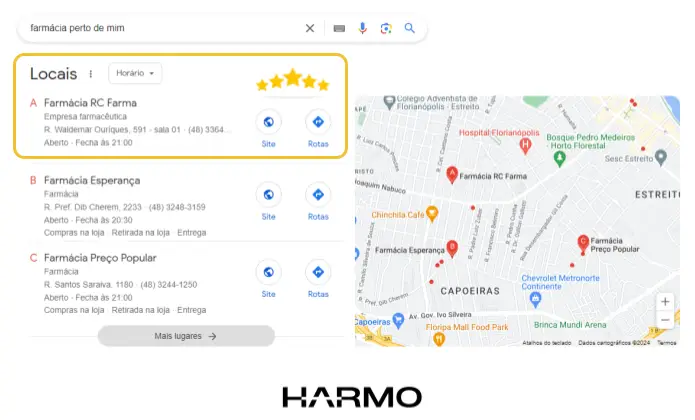
What is the difference between "normal" SEO and Local SEO?
One of the main characteristics that differentiates a "normal" SEO strategy, which aims to increase the quantity and quality of a website's traffic, from Local SEO is the type of result that companies are competing for.
While SEO for websites and web pages focuses primarily on securing high positions in organic search results, Local SEO adds another element to the algorithm's formula—the consumer's location.
Therefore, local SEO strategies are not for improving your global online visibility, but for increasing the visibility of physical stores to the public.
Okay, that's someone who has a clear intention to find a nearby place and make a purchase.
A local SEO strategy helps businesses increase their chances of having their products and services found by local customers at the exact moment consumers are conducting an online search.
Google has dubbed this moment ZMOT , or Zero Moment of Truth.
What is the Zero Moment of Truth (ZMOT)?
The Zero Moment of Truth, or ZMOT, is the research and discovery phase that precedes the purchase decision during the buyer's journey.
For example, how would you choose a hotel for your vacation or even a nice pizzeria for happy hour?
You search on Google and start reading other customers' reviews about their experience with that establishment , and then you make your decision.
ZMOT is precisely that: the moment when the consumer researches and evaluates the options before making their purchase decision.
What determines a consumer's choice during the research phase is, above all, a brand's online reputation. The higher the reputation, the more trust and conversions a brand can achieve.
How does ZMOT apply to your business?
In the following research, you will notice that Brazil is the country that most researches a brand online before making a purchase. Approximately 74% of the Brazilian population connected to the Internet searches for information about a brand online.
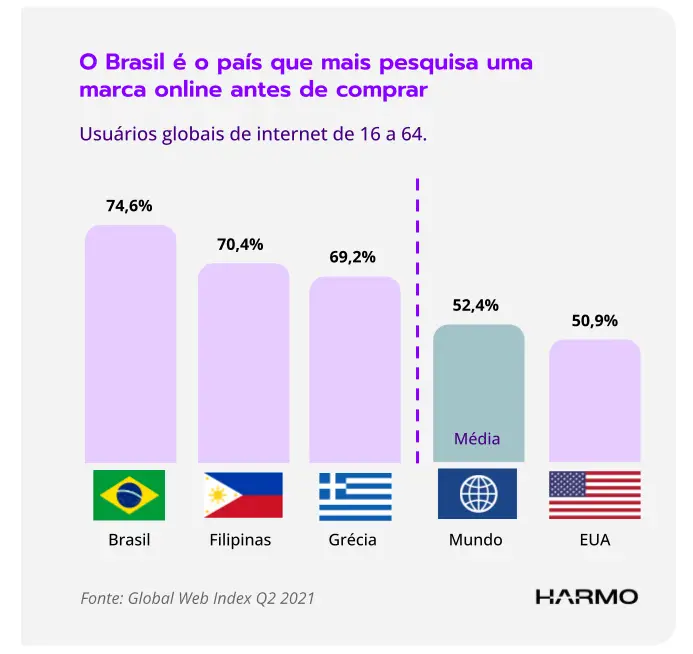
Given this fact, we can conclude that more than 70% of potential sales are impacted by the online reputation of brands.
A study released by HubSpot, "The 2021 State of Experience Marketing," indicated that 57% of marketing professionals in the US believe that managing online reputation is more important than investing in advertising.
That's why, currently, one of the main marketing strategies is related to building a brand's online reputation, being the best and most effective way to influence consumer choices when they are researching and comparing brands, products, stores, or services before making their decision.
A brand's strong online reputation is a fundamental requirement for Google's algorithm when it comes to locally intent searches.
What are locally intent searches?
When a search has local intent, it will be phrased like this: “optics near me” or “optics in [my location]” or simply “optics” in Google Search or Google Maps.
For these types of searches, Google's robots understand that the user wants suggestions for stores near their current location. So these robots show a list of the most relevant and closest establishments.
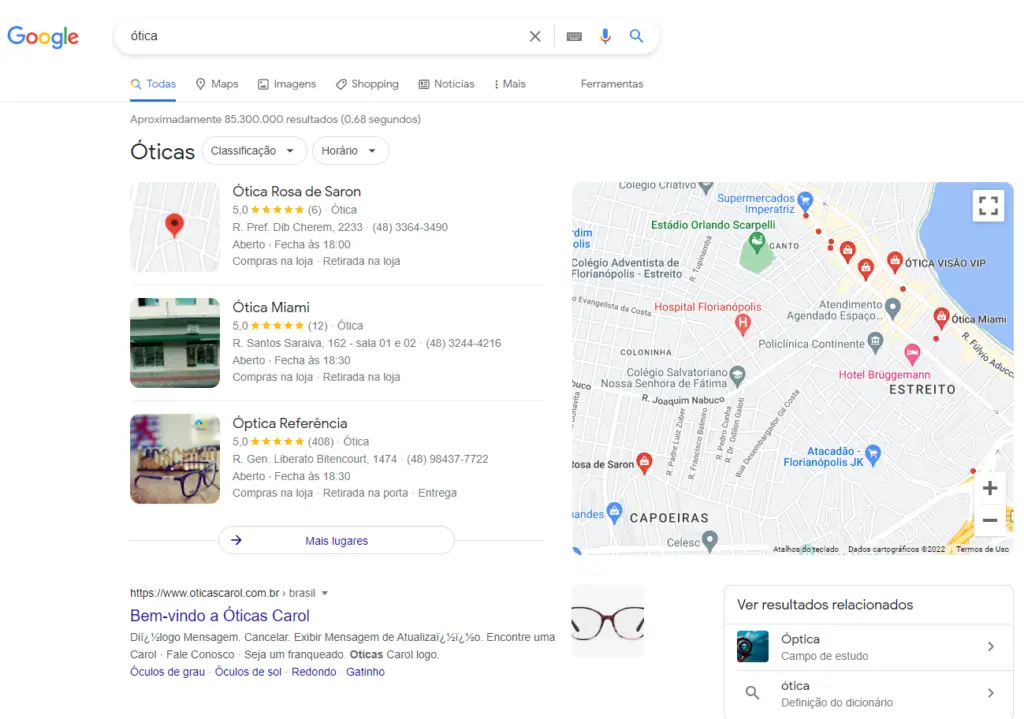
According to Google, searches using the term "near me" have increased by 75%. Typically, you might associate a search "near me" with something like "restaurants near me" or "gas station near me".
But, according to data from Google itself, there is a growth in "near me" searches for very specific items, such as " cowboy near me" or "where to get a facial near me".
See below the growth in local intent searches, as reported by Google, in Brazil:
trends.embed.renderExploreWidget(“TIMESERIES”, {“comparisonItem”:[{“keyword”:”near me”,”geo”:”BR”,”time”:”2017-01-01 2023-10-24″}],”category”:0,”property”:””}, {“exploreQuery”:”date=2017-01-01%202023-10-24&geo=BR&q=perto%20de%20mim&hl=pt”,”guestPath”:”https://trends.google.com.br:443/trends/embed/”});How do searches with local intent or "near me" impact customer acquisition strategies?
According to industry data, 46% of all Google searches have local intent, meaning users are looking for businesses nearby.
Another very interesting piece of data, presented in a recent study by Stone Temple, states that 78% of searches with local intent on mobile devices result in an offline visit to the store within 24 hours.
For you, this means that if your store isn't optimized for local searches, you're likely missing out on potential customers who are near your store and ready to make purchases.
Optimizing the local SEO of your stores will allow you to reduce your customer acquisition cost (CAC) and increase your conversion rate, meaning more sales!
But for this to work, you need to understand the ranking factors for a local intent search.
What are the ranking factors for local SEO?
According to Advice Local's annual report, the top 3 factors influencing local SEO ranking are: Google My Business, Customer Reviews, and Links. (See the report in English here)
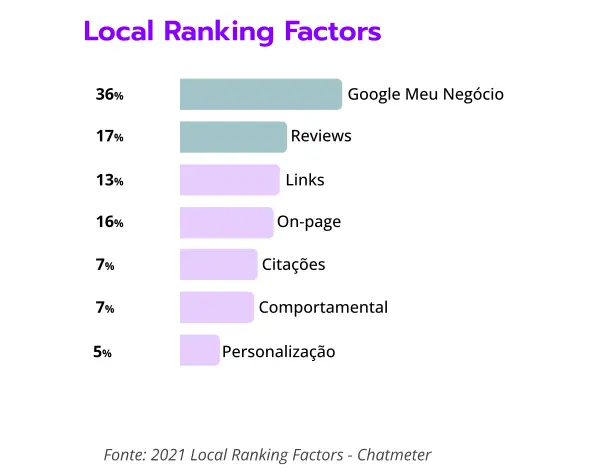
Note that Google My Business has an impressive 36% on local search results. Add to that the 17% of customer reviews.
These two factors account for more than 50% on local intent search results.
If you don't already have a local SEO strategy, now is a good time to start thinking about it 🙂
In addition to these factors, it's very important for you to understand how Googledetermines a store's local ranking.
How Google ranks businesses in local searches
To present the results of a local search, Google's algorithm primarily uses relevance, distance , and prominence (online reputation). These factors are combined to help find the best match for a locally intent search.
According to Google, the algorithm may determine that a business further away from your location is more likely to offer what you're looking for than one that's nearby.
Thus, the company at a greater distance receives a better ranking in the local results.
A. RELEVANCE – how well your company matches what a consumer is looking for
Relevance determines the best match between a local store and a consumer's search. Adding complete and detailed business information helps Google better understand your business and rank it according to its relevance to the user.
We'll show you how to create a complete and optimized Google My Business profile later on.
B. HIGHLIGHT – or Online Reputation is the degree of trust and popularity (number of reviews, rating, interactions, etc. )
The term "highlight" refers to a company's popularity— its online reputation. For example, a company's rating and the number of Google reviews are considered when ranking in local search results.
The more positive reviews and ratings your business has, the better its local ranking will be.
This characteristic is also evaluated based on the web information that Google has about a company, such as links, articles, and directories. Its position in Google Search results is also considered.
C. PROXIMITY – How close are you to the person who performed the search?
Consider the distance between each potential search result and the term used in a local search.
When a user doesn't specify a location in their search, the distance is calculated based on what Google knows about their location.
In December 2021, Google released an important update: the Vicinity Update. This update increases the weight given to the Proximity factor.
What is Google My Business?
Google My Business is a platform where you can create a free business profile and manage how your business appears in Google Search and Google Maps, attracting more customers to your store and e-commerce site.
If your website used to be the online storefront for your physical store, today that role is played by your Google My Business listings!
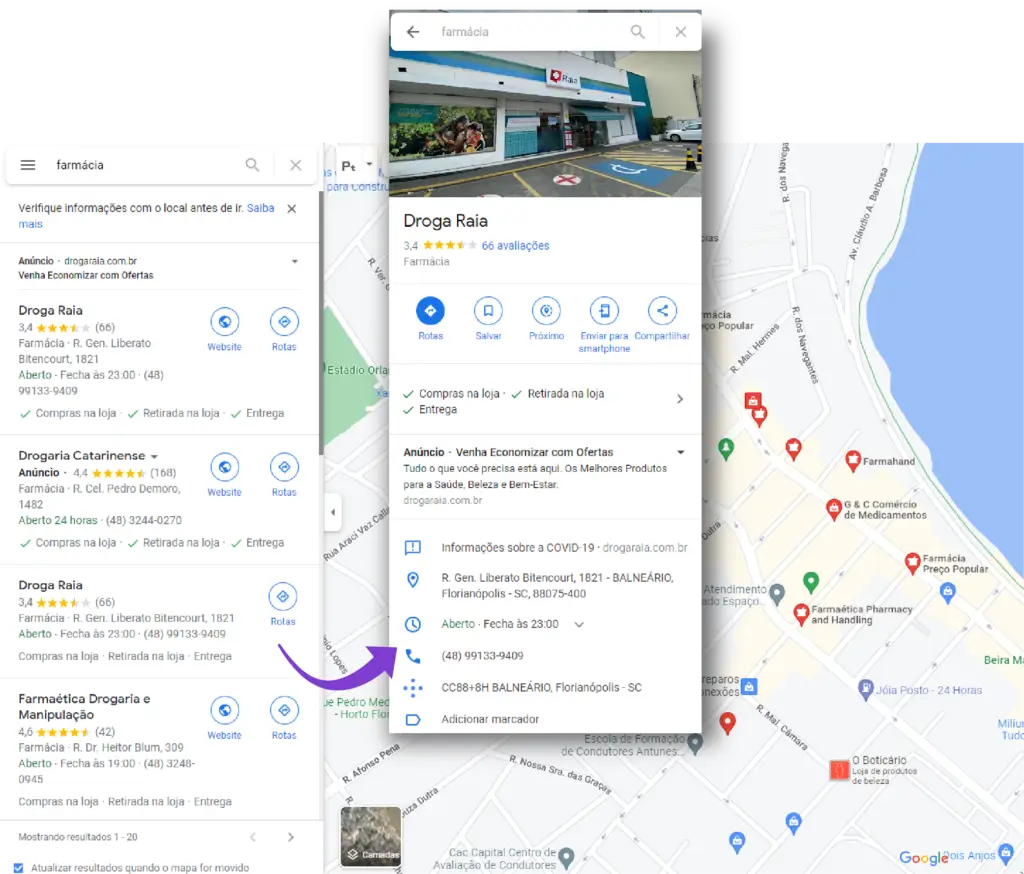
With a Google My Business account, you can share information about your business (including name, location, and hours of operation), add photos, respond to customer reviews, and see how and where people are searching for and finding your store online.
Google My Business (GMB) is a fundamental requirement for achieving consistent results in local search rankings. If you don't already have a profile, now is a good time to create one.
How to create a business profile on Google My Business
The process begins on the following page. Remember that you need a Google account; if you don't have one, create one before starting the process on GMN.
When searching for your company name, one of these three scenarios may occur:
- Your company does not yet have a profile on GMN.
- Your company already has a profile on GMN and you will be making the claim.
- Your company already has a claimed profile on GMN, and you will need to request access from the account administrator.
Regardless of the scenario, the platform is very intuitive; just keep filling in the requested fields. If you have any questions during the process, you can find a step-by-step guide.
How to use Google My Business to attract more local customers
According to industry data, 46% of all Google searches are from users looking for local information (such as stores "near me"), and 4 out of 5 consumers use search engines to find local information.
Right now, thousands of consumers near your storeare searching for something you sell. A complete Google My Business profile helps you achieve a top 3 local pack ranking!
According to Moz, an optimized GMN profile impacts the Local Pack by an incredible 25.12% .
What is the Local Pack?
Local Pack is a section of Google search results that shows the 3 most relevant local businesses for a locally-intent search. 50% of consumers who perform a local search on their smartphones visit a store within a day.
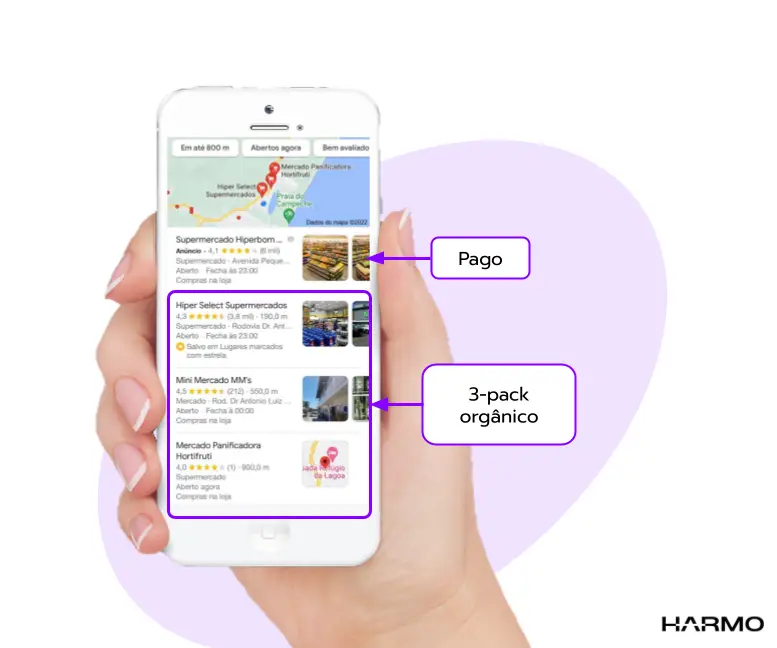
Businesses that win the local pack will enjoy a significant advantage in capturing consumer attention because they will appear first.
Ensure your Google My Business profile is optimized to increase your chances of appearing in the local pack, meaning during the most valuable moments when customers near your store are searching for the products and services you offer.
7 tips to help you have a much more optimized Google My Business profile.
Below are 7 tips to improve your company's profile on Google My Business. We use these same tips here at Harmo with our clients.
We also have a webinar on this topic, and it's definitely worth watching! Webinar: How to correctly register your business on Google My Business
1. Inserting the company name
Fill out the form with only your company's official name. Do not add any other extra information such as location or store number, as this may harm your SEO.
- WRONG! Preço Bom Supermarket – São José (103)
- CORRECT! Good Price Supermarket
If you have more than one unit, maintain a consistent name across all listings. This will strengthen the SEO of all stores.
Do not include any keywords next to your business name.
After the release of the Vicinity Update, Google began penalizing companies that use this practice.
2. Choosing the business category
The chosen business category should describe the core business of your company. You can add additional attributes about your business, but be careful when using this field.
For example, if you own a supermarket that also has a bakery and a butcher shop, you can include those attributes in the additional categories.
However, if you own a mechanic shop that doesn't offer car towing services, but you've occasionally needed to provide this service, don't include car towing in the additional categories, as it may harm rather than benefit your business.
If a consumer finds a product/service that matches your profile but you don't offer, their expectations will be frustrated and, ultimately, they will rate your company negatively, damaging your online reputation.
In addition to the fact that your company is ranking for a keyword that is not relevant to your business.
3. Address
Please provide only the information that is part of your official address. Your complete address may include the room number, floor, building, etc.
Avoid using descriptions such as "corner of Av. Major Santos and Av. Rio Negro" or "opposite Parque dos Coqueiros".
IMPORTANT:
Adjust the pin's position on the map to make it easier for your customer to find your establishment.
4. Company name in multiple locations
The names registered on the forms must be the same across all brand locations to generate a greater impact on indexing
Avoid including the address next to the store name, for example “Lojão da Economia – Santos” or “Lojão da Economia – Ibirapuera”.
For Google, these are two different businesses and not two stores from the same chain, which ultimately reduces their indexing strength.
Standardizing the names for all company units will ensure that listings are indexed together and maximize local SEO results for the entire network.
5. Description
Enter a description of your company: what it offers, what differentiates it from the competition, its history, or other information useful for customers. For example:
"Harmo is the most complete Experiential Marketing platform in Brazil, perfect for use in Retail Chains with physical stores . We are the only 3-in-1 solution that integrates Digital Presence Management ( Google My Business , Facebook Local, TripAdvisor, iFood ) , Reputation Management (Public Reviews), and Customer Satisfaction Survey Management ( NPS, CES, CSAT ), creating a powerful lead generation machine. Listen, interact, analyze, and act focused on customer needs throughout their entire journey , transforming your customers into the main channel for acquiring new clients. Harmo, Experience is the new Marketing ."
Using keywords in the GMN profile description helps index terms that are relevant to our business, attracting more qualified people.
Google does not allow highlighting special offers, prices, and promotions. Examples of prohibited content include "Everything 50% off" or "Best cheese bread in town for R$5!"
6. Inserting images
Invest in professional photos. When you create your profile, include photos that express your brand concept.
Your GMN listing is your online storefront , so it's essential that you post beautiful photos of your establishment, as they convey the first impression of your brand.
According to Google, businesses with photos receive 42% more requests for directions to their store and 35% more clicks on their websites than businesses without photos.
- From the outside
- Include photos of your business from various angles so that customers can recognize the establishment from wherever they come from.
- From the inside
- The photos should help the client recognize the atmosphere through the decor.
- Product photos
- Show the customer the best possible view of the product you offer; showcase your brand's most popular items.
7. Standardization across all units
By doing this, you increase the relevance of your listings to Google's algorithms. With disparate information, you end up dispersing this power. Therefore, ensure a standard for this information:
- Store name on the listing;
- Site;
- Main Category;
- Additional Categories;
- Brand description.
One last tip, but no less important, always keep your address, phone number, and business hours information up to date.
Google Reviews: How do they impact your business?
Companies that regularly use customer reviews as part of their marketing efforts can generate approximately 62% more revenue than companies that don't. (Birdeye, The 2021 State of Online Reviews).
Managing customer reviews is a marketing strategy for customer acquisition. After all, the more reviews a company has, the better it will rank in search results.
Google's little robots think like us, the consumers. We always want to find the best product, the best store, the best service.
So these little robots reward companies with a higher volume of social proof in their favor, that is, more positive reviews and, consequently, a better online reputation.
How responding to Google reviews helps a local SEO strategy
When a customer shares a review publicly, whether positive or negative, they are providing Google with some very important information:
- If the company is a legitimate operation;
- If she has real customers who have interacted with her;
- How well does the company serve its customers?.
Did you know that 45% of consumers say they are more likely to visit a business if it responds to negative reviews? (source: Online Reviews Statistics and Trends: A 2022 Report by ReviewTrackers)
The responses to reviews make a real and measurable difference, not only for the consumer who leaves the review, but for everyone who reads it.
Therefore, responding to reviews is an act of enormous importance and relevance in acquiring new customers. In this way, when your company appears in the search results, it has a greater chance of being the chosen option.
Therefore, it is very important that this task be delegated to the marketing and SEO area, so that the reviews are answered with a focus on indexing and acquisition, transforming public customer feedback into a super marketing strategy!
Responding to customer reviews is a crucial part of local SEO. Therefore, we will detail this topic further below.
How to respond to positive reviews
- be grateful for the feedback, regardless of whether it was positive or neutral.
- Repeat the positive points the customer mentioned; this will reinforce your SEO.
- Always use your company name when responding to positive reviews.
- Use and overuse keywords, highlighting their qualities and strengths.
- Offer new information in your answers; after all, thousands of people will read your responses and learn about the latest news, which can generate more sales.
See how it's possible to respond to reviews with a more strategic approach?
How to respond to negative reviews
- Thank you for your feedback, always! A negative review is the best way for you to correct a problem and improve quality.
- Acknowledge the problem and apologize for the negative experience. Don't try to over-explain; attempting to justify or question the customer will irritate potential clients who read the response. Respond by putting yourself in your customer's shoes and considering how good you'll look by showing that you accept criticism because you always want to improve to better serve your customers.
- Assure customers that steps will be taken to correct the situation and avoid directing the customer to the company's customer service department to explain what happened. If you are unsure what steps to take, simply state that measures are being taken to ensure this never happens again.
- When it comes to a more critical evaluation, direct it offline, especially if it's a review on Facebook, as this channel accepts replies, counter-replies, and even comments from people who have never bought from your company.
- Never include the company name in your responses to negative reviews. You don't want your company name associated with negative experiences in search results.
Bonus! Two more important tips:
- Never take it personally.
- Never use pre-written, copy-and-paste responses. Copying and pasting is worse, much worse, than NOT RESPONDING, because it sends the following message: "All I want is to get rid of these reviews, I don't care what you (the customer) are saying about me.
Conclusion
SEO is an essential strategy for any business that wants to attract more local customers. By optimizing your business's local SEO, you can increase your visibility in Google search results, which can lead to more website visits, more sales, and more customers.
Here are some tips to optimize your company's local SEO:
- Create a complete profile on Google My Business, including information such as name, address, hours of operation, and photos.
- Respond to customer reviews quickly and professionally.
- Use relevant keywords on your website, Google My Business profile, and other online channels.
By following these tips, you can start attracting more local customers to your business.
Bonus: In addition to the tips mentioned above, here are some other things you can do to improve your company's local SEO:
- Participate in local online directories.
- Create relevant content for your field and share it on social media.
- Promote your company at local events.
So if you want to attract these customers, it's essential to have an efficient local SEO strategy that includes managing reviews and brand reputation on Google My Business. Here at Harmo, we are the leading authority in local SEO in Brazil. Feel free to schedule a 25-minute meeting with us.